
Organizing novel characters: how to keep track
The bigger your novel gets, the more characters you have to keep in your head. Here I show you how to organize them so you no longer have to search while you write.
A character reappears after five chapters, and suddenly the question comes up: what color were her eyes? Green? Gray? You flip back, look for the passage where you described her, can't find it and end up writing something. Three weeks later you notice during revision. Or worse: a beta reader does.
As long as a story is small, all the characters fit in your head. But novels grow. Three main characters turn into twelve, and then there are side characters, families, allies, antagonists and the innkeeper from chapter 2 who suddenly becomes important in chapter 19. At some point, memory just isn't enough.
In this article I'll show you how to organize your characters so you keep track of them, without the organizing itself becoming the main job.
Why characters get mixed up so quickly
The problem is rarely that you know too little about your characters. Usually you know quite a lot. It's just scattered everywhere: part of it in a text file, part on a sticky note, part in a spreadsheet, and the most important bit somewhere in the middle of the manuscript, in a subordinate clause in chapter 4.
That's exactly how I used to do it too. For my own book idea, I eventually had a long list of open programs: a word processor for the manuscript, spreadsheets for the characters, notes for ideas. Everything was somewhere, but nothing was in one place.
So the first and most important rule is: every character gets exactly one place where everything about them is written down.
Step 1: A fixed place for every character
A character profile doesn't have to be long. Above all, it has to be easy to find. To start with, this is enough:
- name and any nicknames
- their role in the story
- a few physical traits that appear in the text
- what the character wants and what stands in their way
Everything else can grow as you write. What matters is that new details go into the profile right away, not just into the manuscript.
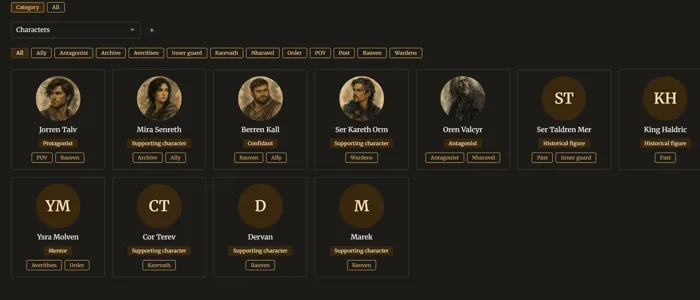
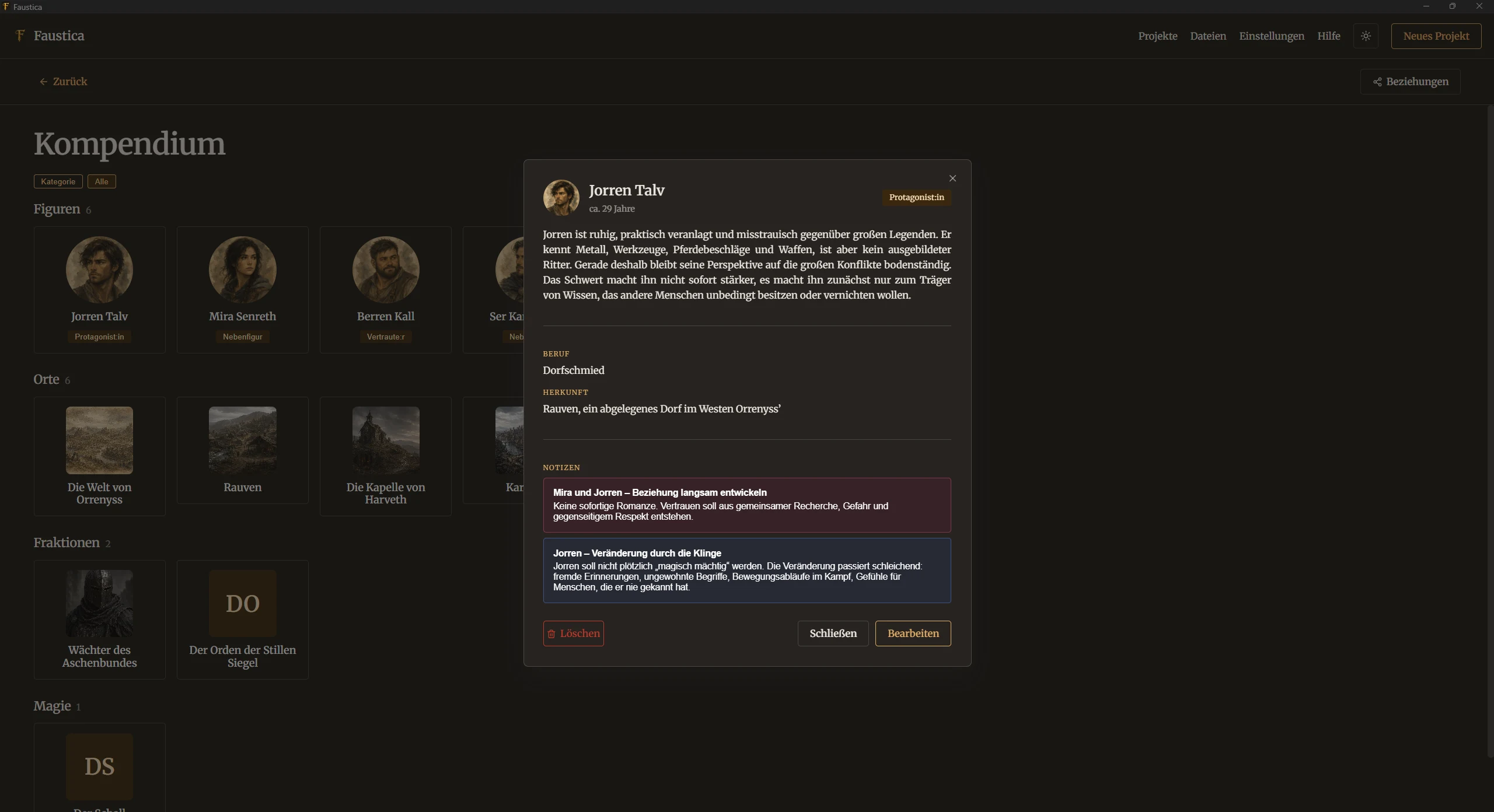
In Faustica, that place is the Compendium. Every character gets their own entry there, with a photo, roles and tags. You can split the description into topic sections, for example appearance, backstory and goals. That way you find the eye color without scrolling through a long block of text.
If you can't think of much for a character yet, the "Ideas" questions available for every entry can help. They aren't mandatory, just a nudge when a character still feels flat.
Step 2: Don't look at characters in isolation
A character on their own isn't a story yet. Things get exciting where characters meet: Who is related to whom? Who owes whom something? Who trusts someone who betrayed them long ago?
Connections like these are especially hard to keep in your head, because they change over the course of the story. A list doesn't help much here. A picture helps more.
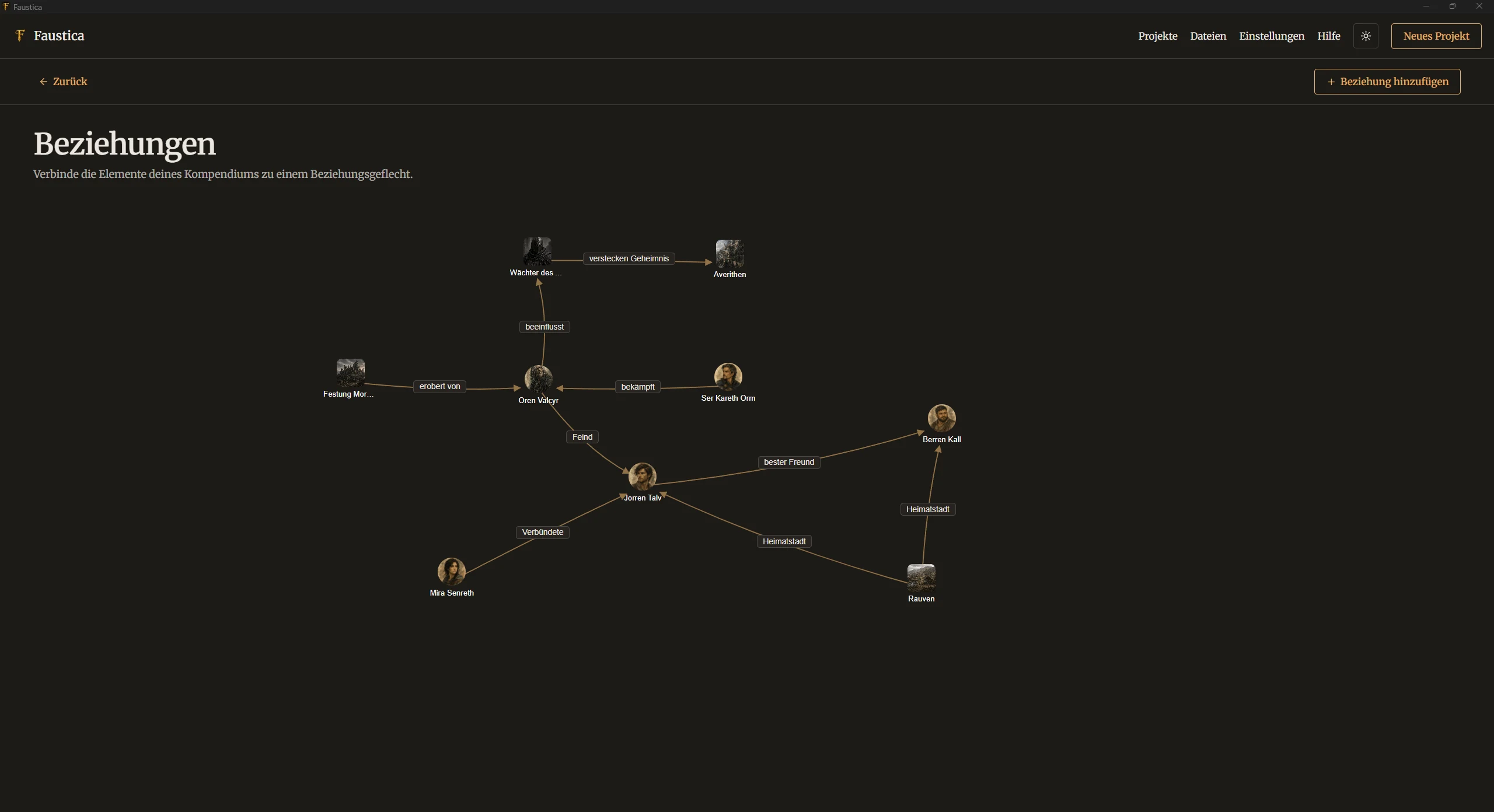
That's what Relationships are for in Faustica. You drag characters, places and other Compendium entries onto a canvas and connect them with labeled arrows. Because the connections have a direction, you can also show one-sided relationships: she admires him, he has no idea. Especially in stories with many factions, you can see at a glance where there's friction and where a character is still standing all alone.
Step 3: Connect characters to the text
A profile is only as good as its connection to the manuscript. During revision, the real question often isn't "Who is this character?" but "Where do they actually appear?"
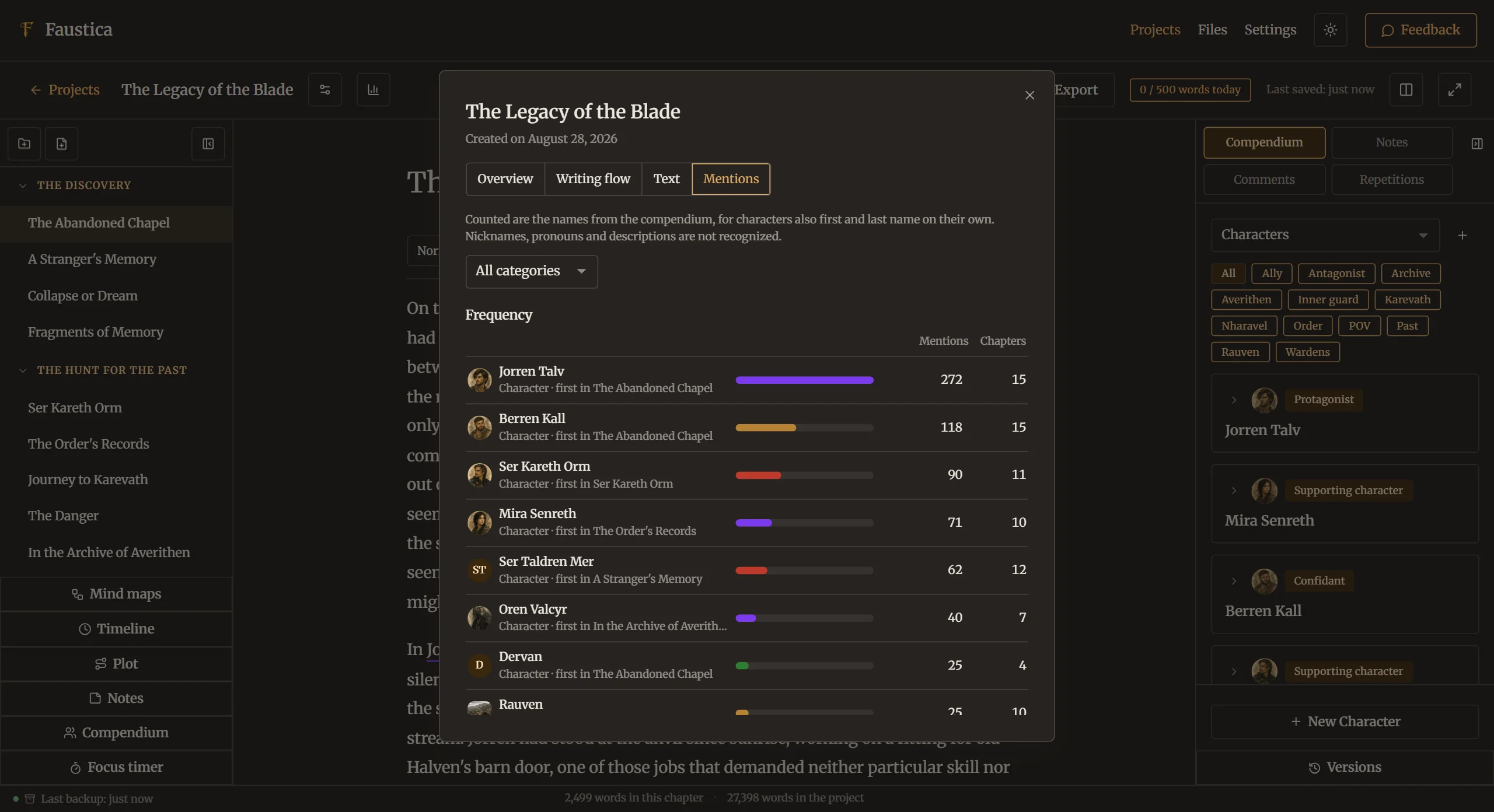
In Faustica you can use Mentions for that. They connect a passage of text directly to the matching Compendium entry. Later you can see which chapters a character appears in, and the project statistics have their own Mentions tab. That's handy when you want to check whether a side character vanishes for half the book even though they play an important role at the end.
Notes can be linked to Compendium entries as well. So if it occurs to you in the shower what really drives your antagonist, the note doesn't end up in limbo, but with her.
Step 4: Plan a character's path through the story
Characters change. The important ones, at least. For that development to feel believable, it helps to look at a character's path from beginning to end once, separately from everything else.
A simple trick: give important characters their own storyline. In Faustica's Plot, you set up storylines as rows and chapters as columns and fill the grid with scene cards. That way you can see for each character which chapters they experience something in. Faustica also points out storylines that have gone quiet, meaning storylines where nothing has happened for a while. With characters, that's often exactly where readers lose sight of them.
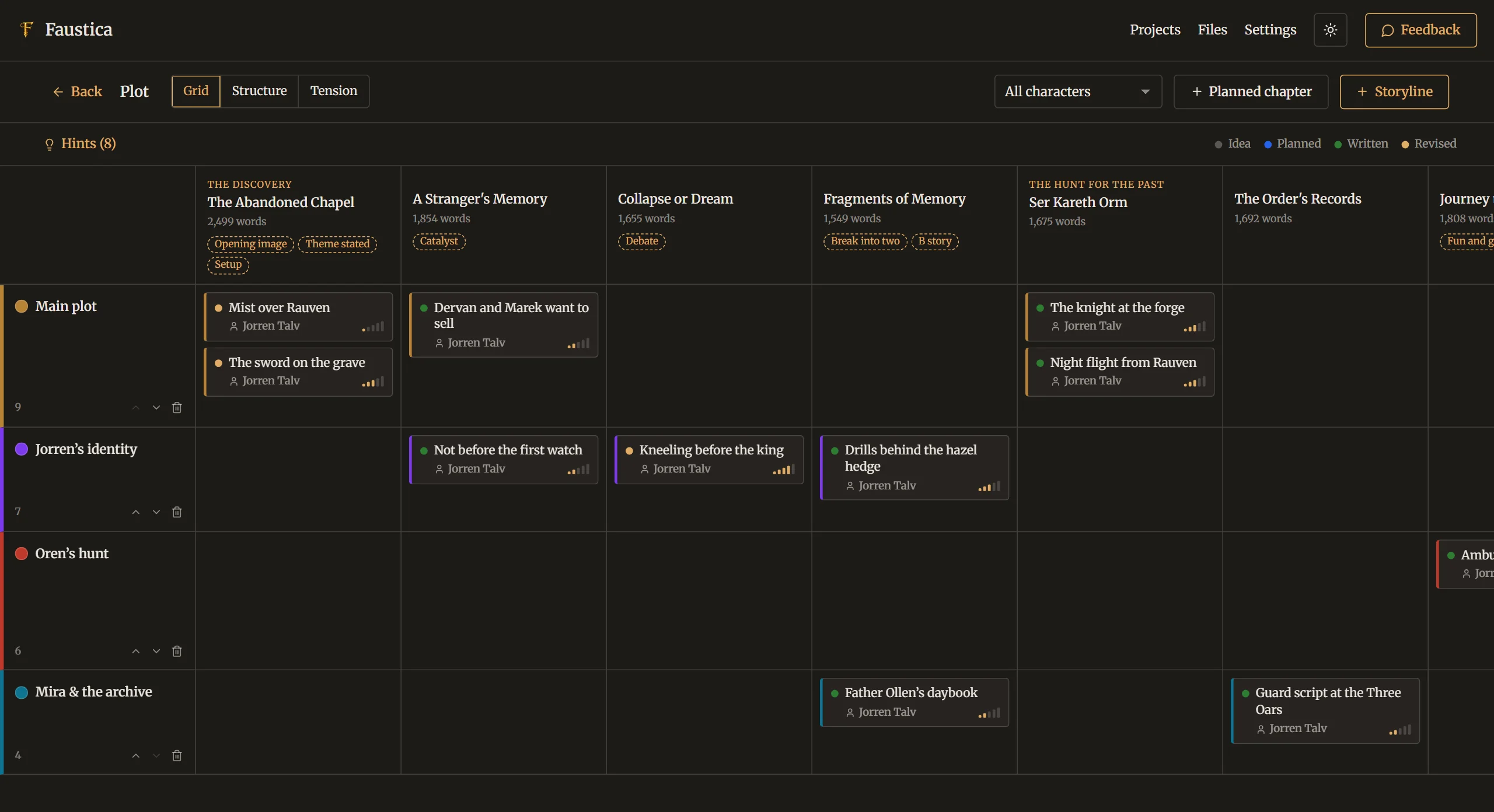
If your story is told with interwoven timelines, the Timeline comes in as well. With parallel tracks, you can follow where each character is while something happens elsewhere. That way you notice when someone would have to be in two places at once in chapter 12.
Step 5: Less is often more
Finally, a thought that matters to me personally: organizing should help you write, not replace writing. It's tempting to create page-long profiles for every character, with favorite food, star sign and childhood memories. Sometimes that helps. Often, though, it's just a very comfortable way of not writing.
My advice: put in the profile what you need for the story, and add to it when a question comes up. A short profile you actually use is worth more than a long one you never open again.
That's also why I didn't stuff Faustica with mandatory fields. The tools are there when you need them and stay out of the way otherwise.
In short
- Every character gets exactly one fixed place where everything about them is written down.
- Make relationships between characters visible rather than hiding them in lists.
- Connect characters to the passages where they appear.
- Plan the path of important characters as a storyline of its own.
- Only record as much as the story needs.
If you'd like to try how this feels in practice, you can test Faustica free for 30 days with the full feature set. You don't need an account or payment details. In the demo project "The Legacy of the Blade" you can see right away how the Compendium, Relationships and Plot work together.
And if you organize your characters completely differently and it works well for you: I'd love to hear about it. I read every message myself, whether it comes directly from the app or to faustica@posteo.de.