
How you format a manuscript depends on who will read it. For a literary agent or publisher, the manuscript should be plain, readable and easy to edit. The conventions most often described as standard manuscript format are a 12-point font such as Times New Roman, double spacing, one-inch margins, indented paragraphs, a header with your name, a short title and the page number, a first page with your contact details and word count, and each chapter starting on a new page. In self-publishing, by contrast, the file is the book itself, in print or as an e-book.
On this page you’ll find step-by-step instructions for a submission manuscript, the main points for print and e-book files, and an example. One rule comes before everything else: if an agent or publisher states their own formatting requirements, those take priority over any general advice.
Two purposes, two formats
A submission manuscript is a working document. The person reading it is assessing your writing, may make notes and shouldn’t be distracted by unusual design. Decorative fonts, drop caps or a homemade cover don’t help; the publisher takes care of the design later.
A publication file in self-publishing, on the other hand, is the finished product. Typography, trim size, binding margins and a working table of contents matter here. You wouldn’t send this file to an agent.
Both share a clean foundation: consistent paragraph styles instead of manual spaces and blank lines, real page breaks instead of rows of returns, consistent quotation marks and dashes. The cleaner the text, the easier it is to produce both formats from it.
How to format a submission manuscript in eight steps
- Read the guidelines. Many agents and publishers state the file format, the number of sample pages, the font or the spacing on their website.
- Choose a plain font. Times New Roman in 12 point is the usual choice today. Courier is the traditional typewriter font of manuscripts and is still requested now and then. William Shunn’s widely used guide Proper Manuscript Format describes both a modern and a classic version.
- Set spacing and margins. Double-spaced, with margins of about one inch on all sides, so there is room for notes. Left-aligned text with a ragged right edge and no automatic hyphenation is the norm.
- Format paragraphs consistently. Indent the first line of each paragraph (half an inch is common) and don’t add extra space between paragraphs. Set the indent in the paragraph style, not with spaces or tabs.
- Start each chapter on a new page. Use a real page break and a clear chapter heading; many writers start the heading a little way down the page. Mark scene breaks within a chapter with a centered symbol such as “#” or “* * *” rather than a blank line, which can disappear at a page break.
- Prepare the first page. Your name and contact details at the top left, the approximate word count at the top right, then the title and your name or pen name. Novel manuscripts often use a separate title page for this. No images, no cover design.
- Add a header. On every page after the first: your surname, a keyword from the title and the page number, for example “Lastname / LEGACY / 12”. If printed pages get mixed up, they can be put back in order.
- Save in the requested file format. Agents often ask for Word files or PDFs, or for the pages pasted into the email. Give the file a clear name with surname, title and type of document.
The synopsis is a separate document and doesn’t necessarily follow manuscript format; again, the recipient’s guidelines apply.
Formatting for self-publishing: print and e-book
If you publish yourself, you usually need two different files. The exact technical requirements are on the help pages of the platform or printer you use; check them before you create the final file.
The print file is usually a PDF in exactly the trim size in which the book will be printed, for example a common paperback size such as 5 × 8 or 6 × 9 inches. It includes:
- a page layout with margins wide enough on the binding side,
- body text in a suitable size, usually justified and hyphenated,
- front matter (title page, copyright page, perhaps a dedication) and, if needed, a table of contents,
- consistently designed chapter openings, often on a right-hand page,
- embedded fonts, so the printer outputs the file exactly as it is.
The e-book in EPUB format has no fixed pages. The text reflows depending on the device and font size. That is why structure matters here: real headings for chapters so the table of contents works, no manual page breaks or blank lines for layout, no fixed page numbers. The cover is a separate image file.
The whole self-publishing route, with ISBNs, cover and editing, is explained on the page Self-publishing your book.
An example: first page and chapter opening
This example formats submission pages for an invented suspense novel with the working title “The Last Ferry.” Its protagonist Rika is a ferrywoman whose financial trouble after an engine failure makes her dependent on her childhood friend Hauke. The first page uses placeholders for length and contact details.
The Last Ferry> Suspense novel> Length: [actual count in the requested format]
[Author name]> [Contact details]
A possible chapter opening:
1 The Breakdown
The shopkeeper tapped the wheelhouse window. Rika raised one finger: one more try.
Format the heading as a chapter heading in the document. Making a paragraph bold does not create a heading structure. The short opening is a possible teaching version; formatting should not imply an existing complete manuscript.
Common mistakes
- Designing instead of formatting. Decorative fonts, colored headings and images in a submission manuscript distract.
- Spaces and blank lines as layout. Indents made of spaces, page breaks made of many returns: when the file is opened on another computer or converted to an e-book, everything shifts.
- Inconsistent characters. Mixed straight and curly quotation marks, or hyphens where dashes belong, look careless. The page on common writing mistakes helps here.
- Forgetting your contact details. A manuscript without your name and email on the first page can’t be matched to you if it gets separated from the query letter.
- Sending the print file as a submission. A PDF typeset in paperback format is harder for agents and editors to work with than a plain manuscript.
Practical tips
- Work with paragraph and heading styles instead of direct formatting. Then you can change the look later with a few clicks.
- Separate writing from output: write in whatever view you find comfortable and create the required format only at the end.
- Keep the version you submitted. If an agent later requests the full manuscript, it should match the sample pages.
Using Faustica
In Faustica you write in a view you like and set the format only when you export. You output the whole manuscript or individual chapters as a Word file, PDF, e-book (EPUB) or Markdown. There are templates for standard manuscript, paperback and e-book. You can adjust page format, margins, font, line spacing and paragraph styling, as well as cover image, title page, table of contents, page numbers and chapter styling.
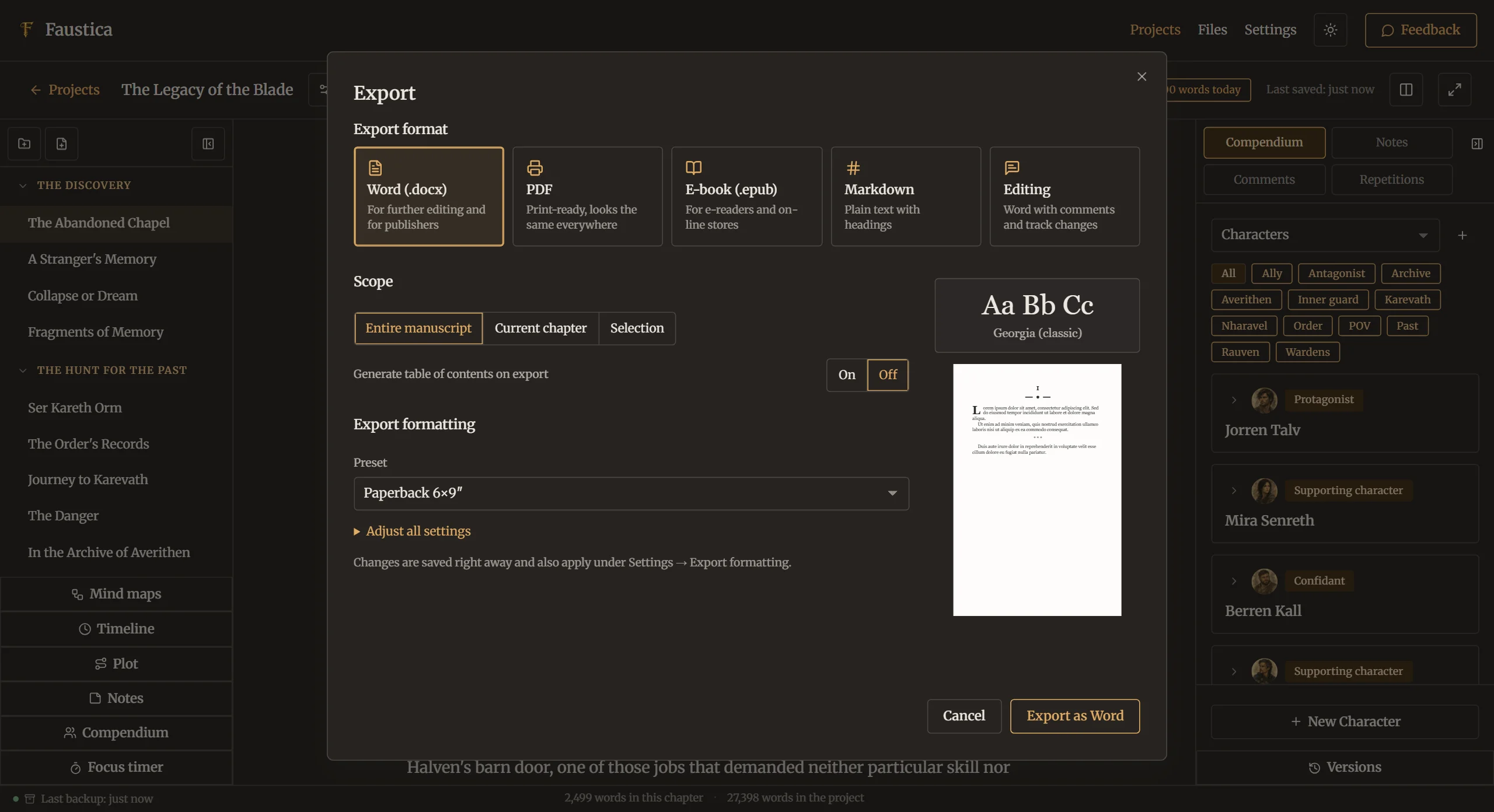
Your chapters stay chapters, just as you created them in the Editor. Whether the exported file meets the technical requirements of a particular platform or printer is something you then check against their help pages, and whether it matches an agent’s formatting wishes against their guidelines.
Frequently asked questions
Do I have to use standard manuscript format?
Not always. Many agents simply ask for a readable 12-point font and double spacing, and some state their own requirements. The recipient’s guidelines are what count. Without any requirements, standard manuscript format is a safe choice.
Times New Roman or Courier?
Today, Times New Roman or a similar readable serif font is the more common choice. Courier is the traditional manuscript font and still requested by some editors and magazines. Use whatever the guidelines name; if they name nothing, either is acceptable as long as you use it consistently.
Word or PDF: which file format is better?
That depends on the recipient. A PDF looks the same everywhere; a Word file is easier to comment on and edit. Many agents ask for sample pages pasted into the body of the email instead. For later work with an editor, an editable file is usually needed.
Does a submission manuscript need a table of contents?
Usually not. For a novel, it isn’t needed to assess the text. In the print edition and e-book, however, it is useful, and in the e-book it matters for navigation.